Zero-Downtime Laravel Deployment on Any Linux VPS Using GitHub Actions (Atomic Deployment)⎘
Learn how to set up atomic, release-based deployments for Laravel on any Linux VPS (Cloudways, Hostinger, DigitalOcean, etc.) with GitHub Actions. No more git pull, no downtime, and automatic rollback on failure.
Prerequisites⎘
- A Laravel app hosted on any Linux VPS with SSH access
- SSH access to your server via PuTTY, Termius, etc.
- A GitHub repository (public or private)
- Basic familiarity with SSH and the Linux command line
spatie/laravel-backupinstalled if you want the DB backup step (optional but recommended)
What This Does⎘
Instead of git pull on every deploy, this system:
- Creates a new timestamped release folder on every push
- Runs all build steps inside it (composer, npm, migrate)
- Atomically switches a
currentsymlink when ready - Auto-rolls back if the HTTP health check fails
- Keeps the last 5 releases for manual rollback
Zero downtime deployment. Safe migrations. Automatic rollback.
Target Folder Structure⎘
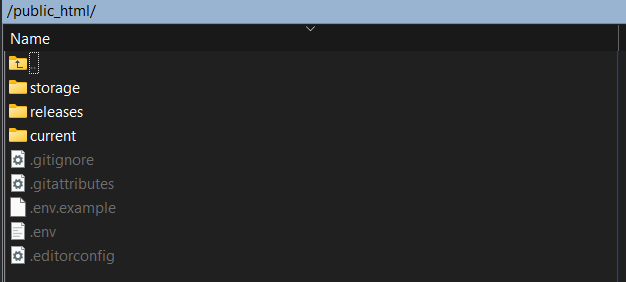
public_html/ ├── current -> releases/20260227182100 # symlink, always points to live release ├── releases/ │ ├── 20260227173045 │ ├── 20260227173641 │ └── 20260227182100 ├── storage/ # shared across all releases └── .env # shared across all releasesWebroot: public_html/current/public
The Problem with Traditional Deployments⎘
The Old Way⎘
public_html/ ├── app/ ├── artisan ├── public/ ├── storage/ └── ...Deploy process:
- SSH in
git pull- Clear cache
- Manually reset permissions
Problems:
- Downtime during deploy
- No rollback path
- OPCache serving stale compiled files
- Broken
public/storageafter redeploys - Manual permission fixes after every deploy
- Risk of editing live files directly
PHASE 1: Initial Server Setup⎘
Step 1 - Create the Release Structure⎘
SSH into your server and navigate to your app root (e.g. public_html or htdocs/yourdomain.com).
1. Create the releases folder:
mkdir releasesmkdir releases/initial2. Move all your Laravel files into it — everything except storage and .env:
mv app artisan bootstrap config database public resources routes vendor composer.json composer.lock package.json package-lock.json postcss.config.js tailwind.config.js vite.config.js releases/initial/3. Create the current symlink pointing to your initial release:
ln -s releases/initial current4. Remove storage from the release folder and replace it with a symlink to the shared one:
rm -rf releases/initial/storageln -s ../../storage releases/initial/storage5. Do the same for .env:
rm -f releases/initial/.envln -s ../../.env releases/initial/.envAt this point your structure should look like:
public_html/├── current -> releases/initial├── releases/│ └── initial/├── storage/└── .envStep 2 - Update Your Webroot⎘
Change your webroot from public_html/public to public_html/current/public.
- On Cloudways:
My Applications → Application Settings → General → Webroot - On CloudPanel: edit the site’s document root in domain settings
- On other hosts: update your Nginx/Apache vhost config directly
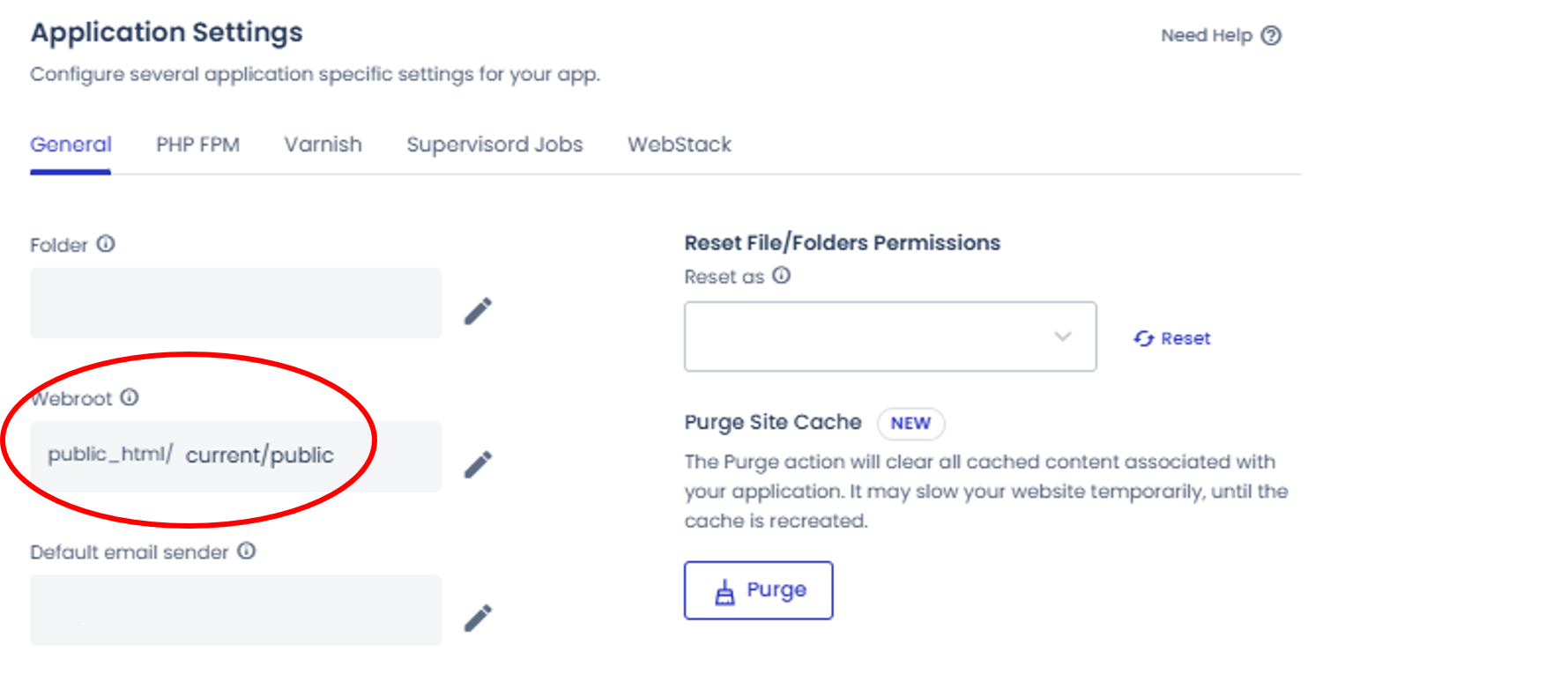
⚠️ Without this, atomic switching does not work.
Step 3 - Clean Up Root⎘
After confirming the site loads correctly, remove leftover files from the app root:
rm -rf app artisan bootstrap config database node_modules public resources \ routes tests vendor composer.json composer.lock package.json \ package-lock.json postcss.config.js tailwind.config.js vite.config.js \ phpunit.xml README.mdFinal root:
public_html/ ├── current ├── releases ├── storage └── .envStep 4 - Configure OPCache (Critical)⎘
Add these to your PHP-FPM configuration (via your control panel’s PHP-FPM settings or php.ini):
php_admin_value[opcache.validate_timestamps]=1php_admin_value[opcache.revalidate_freq]=0php_admin_value[opcache.revalidate_path]=1⚠️ Without opcache.revalidate_path=1, PHP keeps serving compiled files from the previous release even after the symlink switches. This is the most common “deploy succeeded but nothing changed” cause on atomic setups. Also add sudo service php8.2-fpm reload to your deploy script after the symlink swap.
Step 5 - Fix Cron⎘
Old:
cd public_html && php artisan schedule:runNew:
* * * * * cd /home/{user}/{app}/public_html/current && /usr/bin/php artisan schedule:run >> /dev/null 2>&1Replace
{user}and{app}with your actual server user and application folder name. Becauseartisannow lives insidecurrent, not root.
Step 6 - Fix Binary Paths in .env⎘
Any hardcoded paths to binaries inside your app (e.g. wkhtmltopdf) must point to current/, not a specific release:
# ❌ Wrong - breaks after every deployWKHTML_PDF_BINARY=/home/.../public_html/releases/20260227182100/binary/wkhtmltopdf
# ✅ Correct - always resolves to active releaseWKHTML_PDF_BINARY=/home/.../public_html/current/binary/wkhtmltopdf
PHASE 2: SSH + GitHub Setup⎘
Step 7 - Generate Deploy Key on Server⎘
ssh-keygen -t ed25519 -C "vps-deploy"Step 8 - Add Public Key to GitHub⎘
cat ~/.ssh/id_ed25519.pubCopy and add to:
GitHub → Repository → Settings → Deploy Keys → Add Deploy Key
- Title:
VPS Atomic Deploy - Allow write access: No
Test:
ssh -T git@github.com# Output: Hi your-org/your-repo!Step 9 - Add GitHub Secrets⎘
GitHub → Repository → Settings → Secrets and variables → Actions
| Secret | Value |
|---|---|
SERVER_HOST | Your server IP |
SERVER_USER | Your SSH username |
SSH_PRIVATE_KEY | Full contents of ~/.ssh/id_ed25519 including BEGIN/END lines |
PHASE 3: The Deployment Workflow⎘
Before using, update these variables at the top of the script:
| Variable | Replace With |
|---|---|
APP_ROOT | Your actual app path on the server |
APP_USER | The system user that runs your app (web server user) |
REPO | Your GitHub repository SSH URL |
BRANCH | Your deployment branch |
DOMAIN | Your live domain for health check |
PHP_FPM_SERVICE | Your PHP-FPM service name, e.g. php8.2-fpm |
Create this file in your project:
.github/workflows/deploy.yml
name: Deploy (Atomic)
on:  push:    branches: [ main ]
jobs:  deploy:    runs-on: ubuntu-22.04
    steps:      - name: Deploy via SSH        uses: appleboy/ssh-action@v1.1.0        with:          host: ${{ secrets.SERVER_HOST }}          username: ${{ secrets.SERVER_USER }}          key: ${{ secrets.SSH_PRIVATE_KEY }}          script_stop: true          script: |            set -e
            APP_ROOT="/home/your-user/htdocs/yourdomain.com"            REPO="git@github.com:your-org/your-repo.git"            BRANCH="main"            DOMAIN="https://yourdomain.com"            APP_USER="your-app-user"            PHP_FPM_SERVICE="php8.2-fpm"
            DIV="───────────────────────────────────────────────────────────"
            cd $APP_ROOT
            PREVIOUS_RELEASE=$(readlink current || true)
            RELEASE=$(date +%Y%m%d%H%M%S)            echo ""            echo "$DIV"            echo "  🚀 Creating release $RELEASE"            echo "$DIV"            mkdir -p releases/$RELEASE
            # Cleanup failed release if anything breaks before switch            trap "echo ''; echo '$DIV'; echo '  ❌ Deploy failed. Cleaning up release...'; echo '$DIV'; rm -rf $APP_ROOT/releases/$RELEASE" ERR
            echo ""            echo "$DIV"            echo "  📥 Cloning repository..."            echo "$DIV"            git clone --branch $BRANCH --depth 1 $REPO releases/$RELEASE
            echo ""            echo "$DIV"            echo "  🔗 Linking shared storage and .env"            echo "$DIV"            rm -rf releases/$RELEASE/storage            rm -f releases/$RELEASE/.env            ln -s ../../storage releases/$RELEASE/storage            ln -s ../../.env releases/$RELEASE/.env
            cd releases/$RELEASE
            echo ""            echo "$DIV"            echo "  🔐 Fixing binary permissions..."            echo "$DIV"            # Add chmod lines for any bundled binaries your app ships            # chmod +x binary/your-tool/bin/your-binary || true
            echo ""            echo "$DIV"            echo "  📦 Installing Composer dependencies..."            echo "$DIV"            composer install --no-dev --optimize-autoloader --no-interaction
            echo ""            echo "$DIV"            echo "  🎨 Installing Node dependencies and building frontend..."            echo "$DIV"            npm ci            npm run build
            echo ""            echo "$DIV"            echo "  🔧 Fixing release ownership..."            echo "$DIV"            chown -R $APP_USER:user $APP_ROOT/releases/$RELEASE
            echo ""            echo "$DIV"            echo "  💾 Running database backup (DB only)..."            echo "$DIV"            rm -rf $APP_ROOT/storage/app/backup-temp/temp            sudo -u $APP_USER php artisan backup:run --only-db
            echo ""            echo "$DIV"            echo "  🗄 Running database migrations..."            echo "$DIV"            sudo -u $APP_USER php artisan migrate --force --no-interaction --step
            echo ""            echo "$DIV"            echo "  🩺 Pre-switch Laravel health check..."            echo "$DIV"            sudo -u $APP_USER php artisan about > /dev/null            sudo -u $APP_USER php artisan route:list > /dev/null
            cd $APP_ROOT
            echo ""            echo "$DIV"            echo "  🔄 Switching current symlink atomically..."            echo "$DIV"            ln -sfn releases/$RELEASE current_tmp            mv -Tf current_tmp current
            cd current
            echo ""            echo "$DIV"            echo "  🔗 Ensuring public/storage symlink exists..."            echo "$DIV"            rm -rf public/storage            sudo -u $APP_USER php artisan storage:link
            echo ""            echo "$DIV"            echo "  🔧 Fixing storage symlink ownership..."            echo "$DIV"            chown $APP_USER:www-data public/storage
            echo ""            echo "$DIV"            echo "  🔒 Fixing shared storage permissions..."            echo "$DIV"            find $APP_ROOT/storage -type d -perm 700 -exec chmod 750 {} \;            find $APP_ROOT/storage -type f -perm 600 -exec chmod 640 {} \;            chmod 664 $APP_ROOT/storage/logs/laravel.log || true            chown -R $APP_USER:user $APP_ROOT/storage
            echo ""            echo "$DIV"            echo "  🧹 Clearing shared caches..."            echo "$DIV"            sudo -u $APP_USER php artisan view:clear            sudo -u $APP_USER php artisan cache:clear            sudo -u $APP_USER php artisan optimize:clear            sudo -u $APP_USER php artisan schedule:clear-cache            # add your app-specific clear commands here
            echo ""            echo "$DIV"            echo "  ⚡ Rebuilding production caches..."            echo "$DIV"            sudo -u $APP_USER php artisan config:cache            sudo -u $APP_USER php artisan route:cache            sudo -u $APP_USER php artisan view:cache            sudo -u $APP_USER php artisan optimize            # add your app-specific cache commands here
            echo ""            echo "$DIV"            echo "  Reloading PHP-FPM to apply changes..."            echo "$DIV"            sudo service $PHP_FPM_SERVICE reload
            echo ""            echo "$DIV"            echo "  🗺 Generating sitemap..."            echo "$DIV"            sudo -u $APP_USER php artisan sitemap:generate
            echo ""            echo "$DIV"            echo "  🔁 Restarting queue workers..."            echo "$DIV"            sudo -u $APP_USER php artisan queue:restart
            echo ""            echo "$DIV"            echo "  🌐 Post-switch HTTP health check..."            echo "$DIV"            sleep 10
            if ! curl -f -s $DOMAIN > /dev/null; then              echo ""              echo "$DIV"              echo "  ❌ HTTP health check failed! Rolling back..."              echo "$DIV"
              cd $APP_ROOT              ln -sfn $PREVIOUS_RELEASE current_tmp              mv -Tf current_tmp current
              cd current              sudo -u $APP_USER php artisan queue:restart
              echo ""              echo "$DIV"              echo "  🔁 Rollback completed."              echo "$DIV"              exit 1            fi
            echo ""            echo "$DIV"            echo "  🗑 Cleaning old releases (keep last 5)..."            echo "$DIV"            cd $APP_ROOT/releases            ls -dt */ | tail -n +6 | xargs -r rm -rf
            echo ""            echo "$DIV"            echo "  ✅ Deployment completed successfully!"            echo "$DIV"            echo ""
The cache rebuild and cache clear sections include placeholder comments for app-specific commands. Add things like
php artisan icons:cacheor any custom commands your app needs in those sections.
PHASE 4: Deploy Script Explained⎘
| Step | What It Does |
|---|---|
| Timestamped release folder | Every deploy is isolated — never touches live code |
| Clone repo | Fresh copy, no dirty state or leftover files |
| Link storage & .env | Shared across all releases — uploads and config persist |
| Binary permissions | Ensures bundled executables are runnable after clone |
| Composer + npm + build | Production-only dependencies, compiled assets |
| Release ownership fix | Ensures app user owns the release before any artisan calls |
| DB backup | Safety net before running migrations |
Migrate with --step | Runs one migration at a time — easier to debug failures |
| Pre-switch health check | Validates app can boot before going live |
mv -Tf symlink swap | Atomic on same filesystem — true zero downtime |
storage:link | Recreates public/storage → storage/app/public |
| Storage symlink ownership | Ensures the web server can read the symlink target |
| Storage permissions fix | Corrects any root-owned files without breaking www-data access |
| Clear + rebuild caches | Clean slate for new release |
| PHP-FPM reload | Flushes OPCache so the new release takes effect immediately |
| Sitemap generation | Keeps SEO sitemap up to date on every deploy |
queue:restart | Workers gracefully reload with new code |
| HTTP health check | Curls the live domain — rolls back automatically on failure |
| Keep last 5 releases | Built-in rollback history without eating disk |
Real Problems & Fixes FAQs⎘
Deploy succeeds but site doesn’t update⎘
Cause: OPCache caches compiled PHP files by path. After symlink switch, the resolved path changes but OPCache doesn’t know.
Fix: Set opcache.revalidate_path=1 in PHP-FPM settings, and add sudo service php8.2-fpm reload to your deploy script after the symlink switch.
File uploads broken after deploy⎘
Cause: public/storage symlink doesn’t survive across releases.
Fix: php artisan storage:link runs after every symlink switch.
Permission denied writing to storage/logs during deploy⎘
Cause: Files in storage/ were created by the web server user (www-data). The deploy user can’t chmod them.
Fix: Don’t chmod -R shared storage blindly. Use find scoped to only fix files/dirs with overly restrictive permissions (mode 700/600), and scope chown to the release’s own folder.
Binary (e.g. wkhtmltopdf) not found after deploy⎘
Cause: .env had a hardcoded release-specific path, or the binary lost its execute bit after git clone.
Fix 1: Use current/ in the path — it always resolves to the active release.
Fix 2: Add chmod +x binary/your-tool/bin/your-binary || true in the deploy script before composer install.
Artisan commands failing due to wrong file ownership⎘
Cause: Release folder is owned by the SSH deploy user, not the app user. PHP-FPM runs as the app user and can’t write cache files.
Fix: Run chown -R $APP_USER:user releases/$RELEASE before any artisan calls, and always invoke artisan as sudo -u $APP_USER php artisan ....
Old root files causing confusion⎘
Cause: After switching to atomic, the original Laravel files were still sitting in the app root.
Fix: Clean root after confirming atomic deploy works. Keep only current, releases, storage, .env.
Operational Rules⎘
| ❌ Never | ✅ Always |
|---|---|
| Edit files directly on server | Deploy via git push → GitHub Actions |
Run git pull manually | Let CI handle all deployments |
| Hardcode your webroot to a specific release | Keep webroot pointing at current/public |
| Delete release folders manually | Let the deploy script manage cleanup |
Hardcode release paths in .env | Use current/ in all binary/asset paths |
| Run artisan as root | Use sudo -u $APP_USER php artisan ... |
What You Get on This Atomic Deployment Setup⎘
- Zero downtime deployments
- Automatic rollback on HTTP failure
- DB backup before every migration run
- Private repo access via SSH deploy keys
- Clean, predictable server structure
- Shared storage across all releases
- OPCache-compatible atomic switching via PHP-FPM reload
- Correct file ownership handled automatically
- Fully automated CI/CD via GitHub Actions
- Release history with one-command manual rollback potential
Comments & Reactions
(click to open)