Back to Menu

# Laravel Scheduled Maintenance (Laravel Library)

laravel-scheduled-maintenance

Laravel Scheduled Maintenance is a modern Laravel package for scheduling app maintenance, showing upcoming downtime notices, and customizing the maintenance page. Supports Laravel 10, 11, and 12 with PHP 8.1 and newer.

5 min read
#laravel#php#blade#library

Table of Contents

A Modern Version of laravel-scheduled-maintenance by James Burrow

image

Requirements

RequirementVersion
PHP^8.1 (up to latest)
Laravel^10.0 | ^11.0 | ^12.0

Installation

Step 1

Terminal window
composer require emmanpbarrameda/laravel-scheduled-maintenance

Step 2

Publish the config, migration, views, and assets:

Terminal window
php artisan vendor:publish --provider="Emmanpbarrameda\ScheduledMaintenance\ScheduledMaintenanceServiceProvider"

Step 3

Run the migration:

Terminal window
php artisan migrate

Step 4

Register the middleware in bootstrap/app.php (Laravel 11+):

->withMiddleware(function (Middleware $middleware) {
$middleware->prepend(\Emmanpbarrameda\ScheduledMaintenance\Http\Middleware\CheckForScheduledMaintenance::class);
})

Or in app/Http/Kernel.php (Laravel 10):

protected $middleware = [
\Emmanpbarrameda\ScheduledMaintenance\Http\Middleware\CheckForScheduledMaintenance::class,
// ...
];

Configuration

After publishing, edit config/scheduled-maintenance.php:

return [
'table_name' => 'scheduled_maintenance',
'model' => \Emmanpbarrameda\ScheduledMaintenance\Models\ScheduledMaintenanceModel::class,
'redirect_to' => null,
'status_code' => 503,
'bypass_secret' => null,
'bypass_cookie_name' => env('SCHEDULED_MAINTENANCE_BYPASS_COOKIE', 'scheduled_maintenance_bypass'),
'except' => ['status'],
'view' => 'scheduled-maintenance::down',
];

Note: This package relies on your database. If you are performing significant DB work during a maintenance window, consider using Laravel’s native php artisan down command instead.


Artisan Commands

Quickly schedule a maintenance:

Terminal window
php artisan maintenance:schedule --title="Server Update" --starts-at="2026-05-08 21:00:00" --ends-at="2026-05-08 23:00:00" --notify-at="2026-05-08 20:00:00"
image

This creates a maintenance window titled Server Update, starts maintenance at 2026-05-08 9:00 PM, ends it at 11:00 PM, and shows users an upcoming maintenance notice starting at 8:00 PM.

maintenance:schedule Command Options

Terminal window
php artisan maintenance:schedule --title="Server Update" --description="We will be performing server upgrades." --starts-at="2026-05-08 21:00:00" --ends-at="2026-05-08 23:00:00" --notify-at="2026-05-08 20:00:00" --bypass-secret="mysecret" --redirect-to="/maintenance" --status-code=503
OptionDescription
--titleTitle of the maintenance window
--descriptionDescription shown on the maintenance page
--starts-atDate and time when maintenance starts
--ends-atDate and time when maintenance ends
--notify-atDate and time when users should start seeing the upcoming maintenance notice
--bypass-secretSecret URL path used to bypass maintenance mode (can be auto-generated)
--redirect-toURL to redirect users to during maintenance
--status-codeHTTP status code returned during maintenance, default is 503

If an option is not provided, the command will ask for it interactively.

maintenance:down Options

Terminal window
php artisan maintenance:down --bypass-secret=mysecret --redirect-to=/maintenance
OptionDescription
--bypass-secretSecret URL path used to bypass maintenance mode
--redirect-toURL to redirect users to while the app is down

Other Commands

CommandDescription
php artisan maintenance:scheduleSchedule a new maintenance window interactively or using options
php artisan maintenance:downImmediately put the app into maintenance mode
php artisan maintenance:upBring the app out of maintenance mode
php artisan maintenance:upcomingList all upcoming maintenance windows
php artisan maintenance:cancel {id}Cancel a scheduled maintenance window
php artisan maintenance:activateManually activate a maintenance window

How to bypass maintenance page

Simply navigate on browser like:

http://127.0.0.1:8000/random-secret-123
image

Bypass cookie is valid 12 hours. Only users with the bypass cookie can access the app while it is down.


Auto-Maintenance Activation via Queue

Scheduled maintenance automatically dispatches a Laravel queued job that activates the scheduled maintenance time at the starts_at column.

❗ Make sure a laravel queue worker is running via:

Terminal window
php artisan queue:work
image

Note: Make sure your QUEUE_CONNECTION in .env is not set to sync, otherwise delayed jobs will fire immediately instead of at the scheduled time.

QUEUE_CONNECTION=redis # or database

Note: Make sure your server timezone matches the times you schedule. Check config/app.phptimezone and ensure it matches your intended schedule times.

'timezone' => env('APP_TIMEZONE', 'Asia/Manila'),

The app('maintenance') Singleton

app('maintenance')->isDown(); // bool - is app currently in maintenance?
app('maintenance')->down(); // put app into maintenance mode
app('maintenance')->up(); // bring app out of maintenance mode
app('maintenance')->current(); // get the active maintenance window model
app('maintenance')->next(); // get the next scheduled maintenance window
app('maintenance')->scheduled(); // get all future maintenance windows
app('maintenance')->find($id); // find a window by id or uuid
app('maintenance')->delete($id); // delete a window by id or uuid
app('maintenance')->notice(); // get upcoming notice (if display_notice_at has passed)
app('maintenance')->inBypassMode(); // bool - has the user bypassed maintenance?

The package registers a Laravel singleton service using the maintenance key. You can access it anywhere in your Laravel app using app('maintenance').


Blade Components Banners

The package ships with two ready-to-use Blade components. Add them to your main layout (e.g: welcome.blade.php):

<x-scheduled-maintenance::bypass-banner />
<x-scheduled-maintenance::notice-banner />

Notice Banner

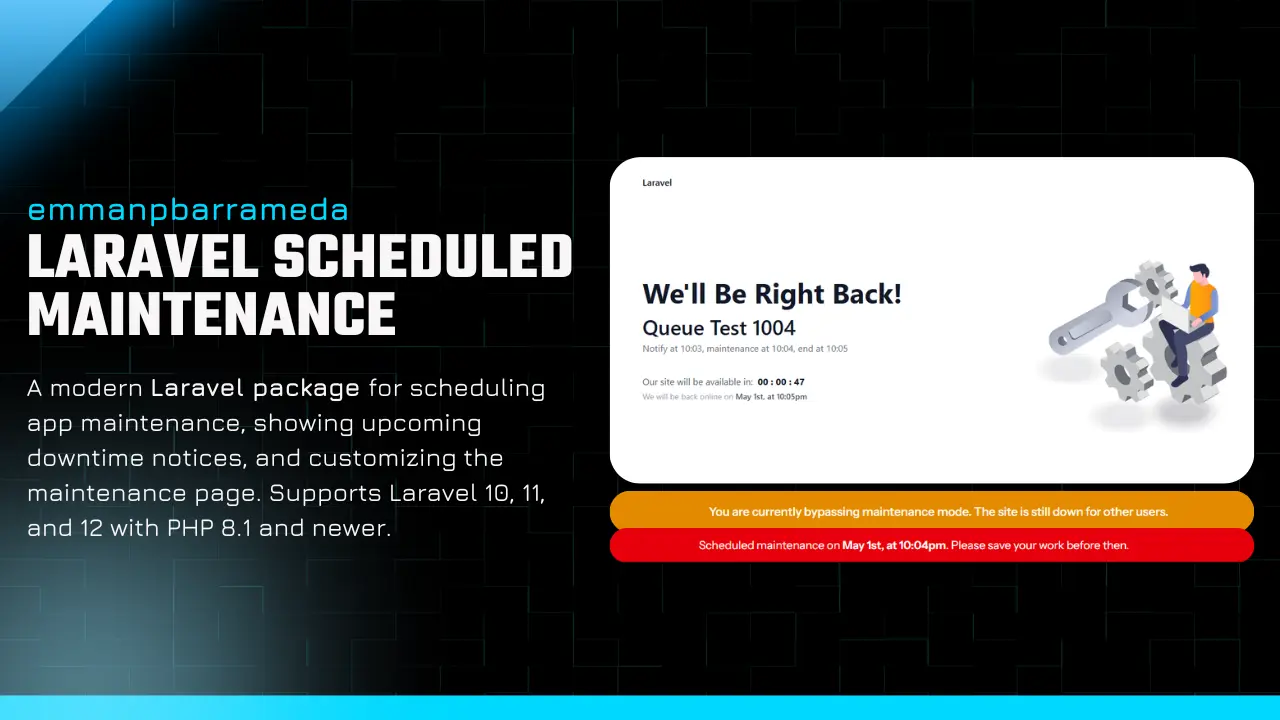
Shows a warning banner when an upcoming maintenance window’s display_notice_at time has passed, notifying users before the maintenance begins. image

Bypass Banner

Shows a fixed top banner when a developer is bypassing maintenance mode. Styled with inline CSS - no Tailwind required. image

After running vendor:publish, you can customize both banners at: resources/views/vendor/scheduled-maintenance/components/


1. Notify Users About Upcoming Maintenance

Using the built-in component (recommended):

<x-scheduled-maintenance::notice-banner />

Or manually in your layout:

@php($maintenanceNotice = app('maintenance')->notice())
@if($maintenanceNotice)
<div>
Scheduled maintenance on
{{ $maintenanceNotice->starts_at->format('F jS, \\a\\t g:ia') }}.
Please save your work before then.
</div>
@endif

2. Show Bypass Banner to Developers

Using the built-in component (recommended):

<x-scheduled-maintenance::bypass-banner />

Or manually:

@if(app('maintenance')->inBypassMode())
<div>
This app is currently in maintenance mode.
Back up by {{ app('maintenance')->current()->ends_at?->format('F jS, \\a\\t g:ia') ?? 'soon' }}.
</div>
@endif

Bypass Maintenance Mode

Navigate to your bypass_secret URL to set a bypass cookie (valid 12 hours). Only users with the cookie can access the app while it is down.


Check Maintenance Status in a Controller

if (app('maintenance')->isDown()) {
return response()->view('errors.maintenance', [], 503);
}

Listen to Maintenance Events

In your AppServiceProvider:

use Emmanpbarrameda\ScheduledMaintenance\Events\MaintenanceStarted;
use Emmanpbarrameda\ScheduledMaintenance\Events\MaintenanceCompleted;
use Emmanpbarrameda\ScheduledMaintenance\Events\MaintenanceCancelled;
use Emmanpbarrameda\ScheduledMaintenance\Events\MaintenanceScheduled;
Event::listen(MaintenanceStarted::class, function ($event) {
// $event->scheduledMaintenance - the model
// $event->wasPreviouslyScheduled - bool
});
Event::listen(MaintenanceCompleted::class, function ($event) {
// app is back up
});

Custom Maintenance View

After publishing, edit the view to match your brand:

resources/views/vendor/scheduled-maintenance/down.blade.php

The default view includes a two-column layout with a countdown timer and an illustration. Replace public/vendor/scheduled-maintenance/maintenance.svg with your own illustration if you want.

Events Reference

EventTriggerExtra Property
MaintenanceScheduledAfter maintenance:schedule-
MaintenanceStartedAfter app('maintenance')->down()$wasPreviouslyScheduled
MaintenanceCompletedAfter app('maintenance')->up()-
MaintenanceCancelledAfter app('maintenance')->delete($id)-

All events expose a public $scheduledMaintenance model property.


Screenshots

image image image

License

MIT - see LICENSE for details.


Credits

Comments & Reactions

(click to open)

Related posts