Zero-Downtime Laravel Deployment on Cloudways Using GitHub Actions (Atomic Deployment)⎘
Learn how to set up atomic, release-based deployments for Laravel on Cloudways with GitHub Actions. No more git pull, no downtime, and automatic rollback on failure.
Prerequisites⎘
- A Laravel app hosted on Cloudways (or any Linux-based hosting with SSH access)
- SSH access to your server via PuTTY, Termius etc.
- A GitHub repository (public or private)
- Basic familiarity with SSH and the Linux command line
spatie/laravel-backupinstalled if you want the DB backup step (optional but recommended)
What This Does⎘
Instead of git pull on every deploy, this system:
- Creates a new timestamped release folder on every push
- Runs all build steps inside it (composer, npm, migrate)
- Atomically switches a
currentsymlink when ready - Auto-rolls back if the HTTP health check fails
- Keeps the last 5 releases for manual rollback
Zero downtime deployment. Safe migrations. Automatic rollback.
Target Folder Structure⎘
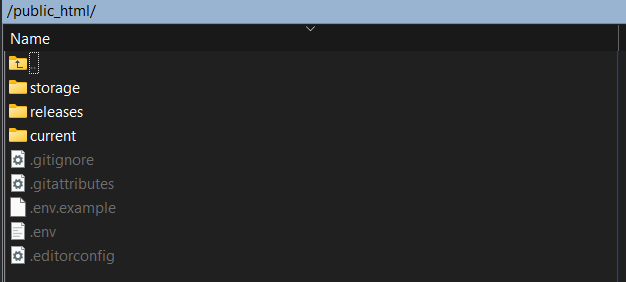
public_html/ ├── current -> releases/20260227182100 # symlink, always points to live release ├── releases/ │ ├── 20260227173045 │ ├── 20260227173641 │ └── 20260227182100 ├── storage/ # shared across all releases └── .env # shared across all releasesCloudways webroot: public_html/current/public
The Problem with Traditional Deployments⎘
The Old Way⎘
public_html/ ├── app/ ├── artisan ├── public/ ├── storage/ └── ...Deploy process:
- SSH in
git pullviaCloudways Deployment via Gitfeature- Clear cache
- Manually reset permissions
Problems:
- Downtime during deploy
- No rollback path
- OPCache serving stale compiled files
- Broken
public/storageafter redeploys - Manual permission fixes after every deploy
- Risk of editing live files directly
PHASE 1: Initial Server Setup⎘
Step 1 - Create the Release Structure⎘
SSH into your server and navigate to public_html.
1. Create the releases folder:
mkdir releasesmkdir releases/initial2. Move all your Laravel files into it — everything except storage and .env:
mv app artisan bootstrap config database public resources routes vendor composer.json composer.lock package.json package-lock.json postcss.config.js tailwind.config.js vite.config.js releases/initial/3. Create the current symlink pointing to your initial release:
ln -s releases/initial current4. Remove storage from the release folder and replace it with a symlink to the shared one:
rm -rf releases/initial/storageln -s ../../storage releases/initial/storage5. Do the same for .env:
rm -f releases/initial/.envln -s ../../.env releases/initial/.envAt this point your structure should look like:
public_html/├── current -> releases/initial├── releases/│ └── initial/├── storage/└── .envStep 2 - Change Cloudways Webroot⎘
Cloudways → My Applications → Application Settings → General → Webroot
Change webroot from:
public_html/publicto:
public_html/current/public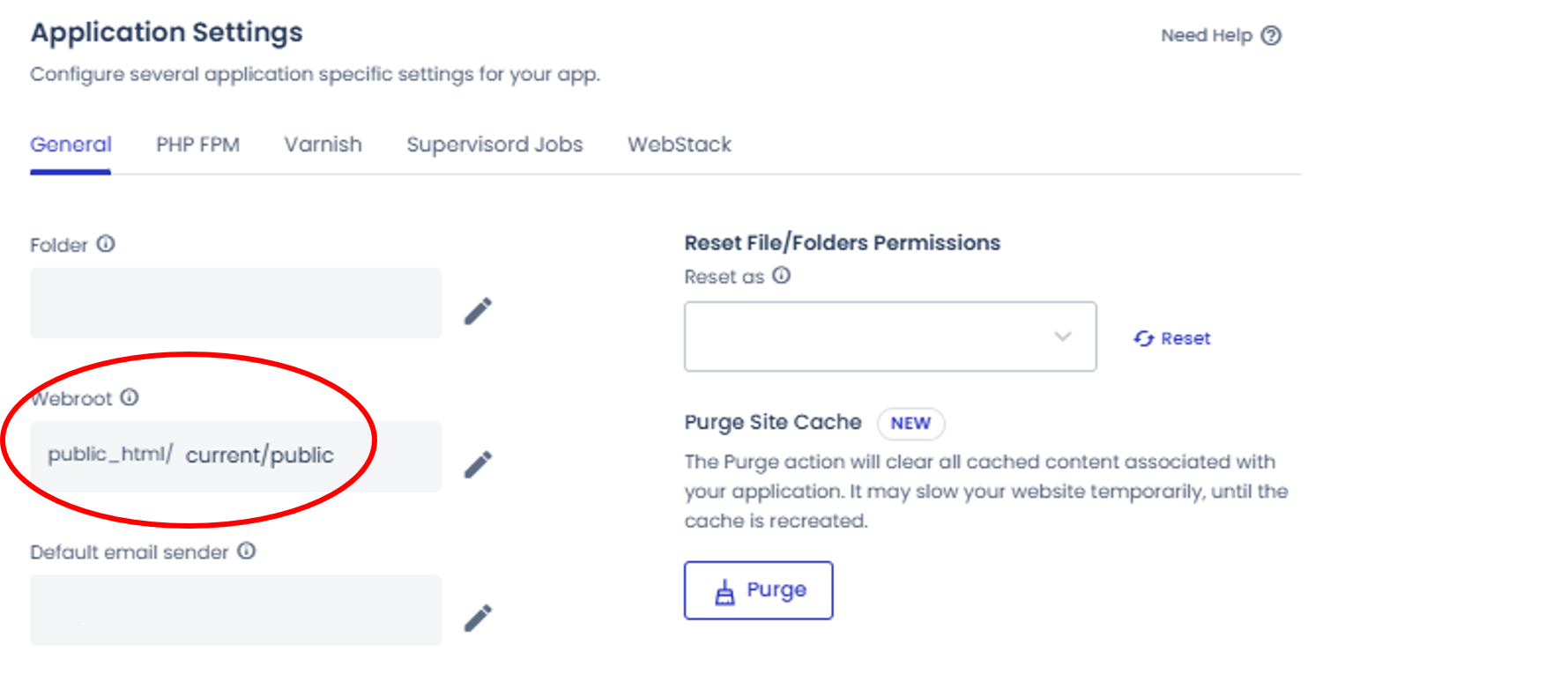
⚠️ Without this, atomic switching does not work.
Step 3 - Clean Up Root⎘
After confirming the site loads correctly, remove leftover files from public_html root:
rm -rf app artisan bootstrap config database node_modules public resources routes tests vendor composer.json composer.lock package.json package-lock.json postcss.config.js tailwind.config.js vite.config.js phpunit.xml README.mdFinal root:
public_html/ ├── current ├── releases ├── storage └── .envStep 4 - Configure OPCache (Critical)⎘
Cloudways → My Applications → Application Settings → PHP FPM
Add on text-area:
php_admin_value[opcache.validate_timestamps]=1php_admin_value[opcache.revalidate_freq]=0php_admin_value[opcache.revalidate_path]=1⚠️ Without opcache.revalidate_path=1, PHP keeps serving compiled files from the previous release even after the symlink switches. This is the most common “deploy succeeded but nothing changed” cause on atomic setups.
Step 5 - Fix Cron⎘
Cloudways → My Applications → Cron Job Management → Advanced
Old:
cd public_html && php artisan schedule:runNew:
* * * * * cd /home/{user}/{app}/public_html/current && /usr/bin/php artisan schedule:run >> /dev/null 2>&1Replace
{user}and{app}with your actual Cloudways/Hosting server user and application folder name. Becauseartisannow lives insidecurrent, not root.
Step 6 - Fix Binary Paths in .env⎘
Any hardcoded paths to binaries inside your app (e.g. wkhtmltopdf) must point to current/, not a specific release:
# ❌ Wrong - breaks after every deployWKHTML_PDF_BINARY=/home/.../public_html/releases/20260227182100/binary/wkhtmltopdf
# ✅ Correct - always resolves to active releaseWKHTML_PDF_BINARY=/home/.../public_html/current/binary/wkhtmltopdf
PHASE 2: SSH + GitHub Setup⎘
Step 7 - Generate Deploy Key on Server⎘
ssh-keygen -t ed25519 -C "cloudways-deploy"Step 8 - Display public key:⎘
cat ~/.ssh/id_ed25519.pubCopy and Add the public key to:
GitHub → Repository → Settings → Deploy Keys → Add Deploy Keys
- Title:
Cloudways Atomic Deploy - Allow write access: No
Test:
ssh -T git@github.com# Output: Hi your-org/your-repo!Step 9 - Add GitHub Secrets⎘
GitHub → Repository → Settings → Secrets and variables → Actions
| Secret | Value |
|---|---|
SERVER_HOST | Your server IP |
SERVER_USER | Your SSH username |
SSH_PRIVATE_KEY | Full contents of ~/.ssh/id_ed25519 including BEGIN/END lines |
PHASE 3: The Deployment Workflow⎘
Before using, update these variables at the top of the script:
| Variable | Replace With |
|---|---|
APP_ROOT | Your actual app path on the server |
REPO | Your GitHub repository SSH URL |
BRANCH | Your deployment branch |
DOMAIN | Your live domain for health check |
Create this file in your project:
.github/workflows/deploy.yml
name: Cloudways Deploy (Atomic)
on:  push:    branches: [ main ]
jobs:  deploy:    runs-on: ubuntu-22.04
    steps:      - name: Deploy via SSH        uses: appleboy/ssh-action@v1.1.0        with:          host: ${{ secrets.SERVER_HOST }}          username: ${{ secrets.SERVER_USER }}          key: ${{ secrets.SSH_PRIVATE_KEY }}          script_stop: true          script: |            set -e
            APP_ROOT="/home/deployer/applications/myapp123/public_html"            REPO="git@github.com:your-org/your-repo.git"            BRANCH="main"            DOMAIN="https://example.com"
            DIV="───────────────────────────────────────────────────────────"
            cd $APP_ROOT
            PREVIOUS_RELEASE=$(readlink current || true)
            RELEASE=$(date +%Y%m%d%H%M%S)            echo ""            echo "$DIV"            echo "  🚀 Creating release $RELEASE"            echo "$DIV"            mkdir -p releases/$RELEASE
            # Cleanup failed release if anything breaks before switch            trap "echo ''; echo '$DIV'; echo '  ❌ Deploy failed. Cleaning up release...'; echo '$DIV'; rm -rf $APP_ROOT/releases/$RELEASE" ERR
            echo ""            echo "$DIV"            echo "  📥 Cloning repository..."            echo "$DIV"            git clone --branch $BRANCH --depth 1 $REPO releases/$RELEASE
            echo ""            echo "$DIV"            echo "  🔗 Linking shared storage and .env"            echo "$DIV"            rm -rf releases/$RELEASE/storage            rm -f releases/$RELEASE/.env            ln -s ../../storage releases/$RELEASE/storage            ln -s ../../.env releases/$RELEASE/.env
            cd releases/$RELEASE
            echo ""            echo "$DIV"            echo "  📦 Installing Composer dependencies..."            echo "$DIV"            composer install --no-dev --optimize-autoloader --no-interaction
            echo ""            echo "$DIV"            echo "  🎨 Installing Node dependencies and building frontend..."            echo "$DIV"            npm ci            npm run build
            echo ""            echo "$DIV"            echo "  💾 Running database backup (DB only)..."            echo "$DIV"            rm -rf $APP_ROOT/storage/app/backup-temp/temp            php artisan backup:run --only-db
            echo ""            echo "$DIV"            echo "  🗄 Running database migrations..."            echo "$DIV"            php artisan migrate --force --no-interaction --step
            echo ""            echo "$DIV"            echo "  🩺 Pre-switch Laravel health check..."            echo "$DIV"            php artisan about > /dev/null            php artisan route:list > /dev/null
            cd $APP_ROOT
            echo ""            echo "$DIV"            echo "  🔄 Switching current symlink atomically..."            echo "$DIV"            ln -sfn releases/$RELEASE current_tmp            mv -Tf current_tmp current
            cd current
            echo ""            echo "$DIV"            echo "  🔗 Ensuring public/storage symlink exists..."            echo "$DIV"            rm -rf public/storage            php artisan storage:link
            echo ""            echo "$DIV"            echo "  🔧 Fixing permissions..."            echo "$DIV"            find $APP_ROOT/releases/$RELEASE/public -type d -exec chmod 775 {} \;            find $APP_ROOT/releases/$RELEASE/public -type f -exec chmod 664 {} \;
            echo ""            echo "$DIV"            echo "  🧹 Clearing shared caches..."            echo "$DIV"            php artisan view:clear            php artisan cache:clear            php artisan optimize:clear            php artisan schedule:clear-cache
            echo ""            echo "$DIV"            echo "  ⚡ Rebuilding production caches..."            echo "$DIV"            php artisan config:cache            php artisan route:cache            php artisan optimize            # add your app-specific cache commands here
            echo ""            echo "$DIV"            echo "  🔁 Queuing server is restarting..."            echo "$DIV"            php artisan queue:restart
            echo ""            echo "$DIV"            echo "  🌐 Post-switch HTTP health check..."            echo "$DIV"            sleep 10
            if ! curl -f -s $DOMAIN > /dev/null; then              echo ""              echo "$DIV"              echo "  ❌ HTTP health check failed! Rolling back..."              echo "$DIV"
              cd $APP_ROOT              ln -sfn $PREVIOUS_RELEASE current_tmp              mv -Tf current_tmp current
              cd current              php artisan queue:restart
              echo ""              echo "$DIV"              echo "  🔁 Rollback completed."              echo "$DIV"              exit 1            fi
            echo ""            echo "$DIV"            echo "  🗑 Cleaning old releases (keep last 5)..."            echo "$DIV"            cd $APP_ROOT/releases            ls -dt */ | tail -n +6 | xargs -r rm -rf
            echo ""            echo "$DIV"            echo "  ✅ Deployment completed successfully."            echo "$DIV"            echo ""
The cache rebuild section includes a placeholder comment for app-specific commands. Add commands like
php artisan sitemap:generateor any custom cache commands your app needs there.
PHASE 4: Deploy YAML Script Explained⎘
| Step | What It Does |
|---|---|
| Timestamped release folder | Every deploy is isolated - never touches live code |
| Clone repo | Fresh copy, no dirty state or leftover files |
| Link storage & .env | Shared across all releases - uploads and config persist |
| Composer + npm + build | Production-only dependencies, compiled assets |
| DB backup | Safety net before running migrations |
Migrate with --step | Runs one migration at a time - easier to debug failures |
| Pre-switch health check | Validates app can boot before going live |
mv -Tf symlink swap | Atomic on same filesystem - true zero downtime |
storage:link | Recreates public/storage → storage/app/public |
find chmod on public/ | Deploy user owns public/ - sets correct permissions |
| Clear + rebuild caches | Clean slate for new release |
queue:restart | Workers gracefully reload with new code |
| HTTP health check | Curls the live domain - rolls back automatically on failure |
| Keep last 5 releases | Built-in rollback history without eating disk |
Real Problems & Fixes⎘
Deploy succeeds but site doesn’t update⎘
Cause: OPCache caches compiled PHP files by path. After symlink switch, the resolved path changes but OPCache doesn’t know.
Fix: Set opcache.revalidate_path=1 in PHP FPM settings
File uploads broken after deploy⎘
Cause: public/storage symlink doesn’t survive across releases.
Fix: php artisan storage:link runs after every symlink switch.
Permission denied writing to storage/logs during deploy⎘
Cause: Files in storage/ were created by the web server user (www-data). The deploy user can’t chmod them.
Fix: Don’t chmod -R shared storage. Only fix permissions on the release’s public/ folder which the deploy user owns.
Binary (e.g. wkhtmltopdf) not found after deploy⎘
Cause: .env had a hardcoded release-specific path.
Fix: Use current/ in the path - it always resolves to the active release.
chmod errors on storage files during deploy⎘
Cause: Storage files owned by www-data - deploy SSH user can’t modify them.
Fix: Remove chmod -R on storage entirely. Use find scoped to releases/$RELEASE/public only.
Old root files causing confusion⎘
Cause: After switching to atomic, the original Laravel files were still sitting in public_html root.
Fix: Clean root after confirming atomic deploy works. Keep only current, releases, storage, .env.
Operational Rules⎘
| ❌ Never | ✅ Always |
|---|---|
| Edit files directly on server | Deploy via git push → GitHub Actions |
Run git pull manually | Let CI handle all deployments |
| Change the Cloudways webroot | Keep storage/ and .env at root, shared |
| Delete release folders manually | Let the deploy script manage cleanup |
Hardcode release paths in .env | Use current/ in all binary/asset paths |
What You Get on this Atomic Deployment Setup on Cloudways or any hosting⎘
- Zero downtime deployments
- Automatic rollback on failure
- DB backup before every migration run
- Private repo access via SSH deploy keys
- Clean, predictable server structure
- Shared storage across all releases
- OPCache-compatible atomic switching
- Fully automated CI/CD via GitHub Actions
- Release history with one-command manual rollback potential
Comments & Reactions
(click to open)